# Mycroft Skills Kit
The Mycroft Skills Kit - `msk` - is a Python-based utility that has been created to make it easier for **Skill** Authors to create, test and submit **Skills** to the [Skills Marketplace](https://market.mycroft.ai). We hope this utility helps to shorten the development cycle, and remove some of the tedious parts of **Skill** creation.
`msk` currently supports the following features:
* Create a new **Skill**
* Create an `Intent` test for a **Skill**
* Upload a **Skill**
* Upgrade an existing **Skill**
## Installing msk
*NOTE: `msk` has only been tested on Linux systems*
`msk` comes pre installed on the [Mark 1](https://mycroft.ai/documentation/mark-1), [Picroft](https://mycroft.ai/documentation/picroft) and the `git` installation of Mycroft-core. The utility is self-contained and can be installed separately using `pip` by typing the following line into the terminal on your Linux system:
```bash
pip3 install msk
```
You should then see output like the below:
```bash
Collecting msk
Downloading https://files.pythonhosted.org/packages/69/d9/1d41acac01b1e6f9004963606f0b9f939a917e240a955a657f6dc1844836/msk-0.3.8.tar.gz
Collecting GitPython (from msk)
Using cached https://files.pythonhosted.org/packages/ac/c9/96d7c86c623cb065976e58c0f4898170507724d6b4be872891d763d686f4/GitPython-2.1.10-py2.py3-none-any.whl
Collecting typing (from msk)
Using cached https://files.pythonhosted.org/packages/05/2b/2b05bf1d5a9dd450447c9a5df3e118a465e5d3cb12b73b7220a5064a403f/typing-3.6.4-py3-none-any.whl
Collecting msm>=0.5.13 (from msk)
Collecting pygithub (from msk)
Collecting gitdb2>=2.0.0 (from GitPython->msk)
Using cached https://files.pythonhosted.org/packages/e0/95/c772c13b7c5740ec1a0924250e6defbf5dfdaee76a50d1c47f9c51f1cabb/gitdb2-2.0.3-py2.py3-none-any.whl
Collecting pyjwt (from pygithub->msk)
Using cached https://files.pythonhosted.org/packages/93/d1/3378cc8184a6524dc92993090ee8b4c03847c567e298305d6cf86987e005/PyJWT-1.6.4-py2.py3-none-any.whl
Collecting smmap2>=2.0.0 (from gitdb2>=2.0.0->GitPython->msk)
Using cached https://files.pythonhosted.org/packages/e3/59/4e22f692e65f5f9271252a8e63f04ce4ad561d4e06192478ee48dfac9611/smmap2-2.0.3-py2.py3-none-any.whl
Building wheels for collected packages: msk
Running setup.py bdist_wheel for msk ... done
Stored in directory: /home/kathyreid/.cache/pip/wheels/b8/d7/7d/c650d047645e875a4c301821844ded868db716b877fdae8b9b
Successfully built msk
Installing collected packages: smmap2, gitdb2, GitPython, typing, msm, pyjwt, pygithub, msk
Successfully installed GitPython-2.1.10 gitdb2-2.0.3 msk-0.3.8 msm-0.5.14 pygithub-1.39 pyjwt-1.6.4 smmap2-2.0.3 typing-3.6.4
```
To check that the installation was successful `msk --help` can be run and should list the arguments and options for the utility.
## Usage
The normal commands for `msk` are:
```bash
msk create
msk create-test /opt/mycroft/skills/myskill
msk upload /opt/mycroft/skills/myskill
msk upgrade /opt/mycroft/skills/myskill
```
If using the built-in installation of `msk` with a Mycroft device or Mycroft git installation, use `mycroft-msk` in place of `msk`:
```bash
mycroft-msk create
mycroft-msk create-test /opt/mycroft/skills/myskill
mycroft-msk upload /opt/mycroft/skills/myskill
mycroft-msk upgrade /opt/mycroft/skills/myskill
```
## Create
Next, we use the `msk create` function. You will be prompted to enter the required information to help set up your **Skill**.
```bash
$ msk create
Enter a short unique skill name (ie. "siren alarm" or "pizza orderer"):
Feed the Corgi
Class name: FeedTheCorgiSkill
Repo name: feed-the-corgi-skill
Looks good? (Y/n) Y
Enter a one line description for your skill (ie. Orders fresh pizzas from the store):
- Reminds you to feed your poor starving Corgi
Enter a long description:
> Every 24 hours, Mycroft will send you a reminder to feed your Corgi, and tell you what your Corgi was fed the previous day, so you can provide a different delicious meal for your precious Corgi.
>
Enter some example phrases to trigger your skill:
- Have I fed the Corgi today
- What did I feed the Corgi yesterday
- Remind me to feed the Corgi at 5pm
-
Enter author: YourGitHubUserName
Categories define where the skill will display in the Marketplace. It must be one of the following:
Daily, Configuration, Entertainment, Information, IoT, Music & Audio, Media, Productivity, Transport.
Enter the primary category for your skill:
- Daily
Enter additional categories (optional):
- Productivity
-
Enter tags to make it easier to search for your skill (optional):
- Dogs
-
Would you like to create a GitHub repo for it? (Y/n) Y
=== GitHub Credentials ===
Username: YourGitHubUserName
Password:
Counting objects: 12, done.
Delta compression using up to 8 threads.
Compressing objects: 100% (5/5), done.
Writing objects: 100% (12/12), 1.44 KiB | 0 bytes/s, done.
Total 12 (delta 0), reused 0 (delta 0)
To https://github.com/YourGitHubUserName/feed-the-corgi-skill
* [new branch] master -> master
Branch master set up to track remote branch master from origin.
Created GitHub repo: https://github.com/YourGitHubUserName/feed-the-corgi-skill
Created skill at: /opt/mycroft/skills/feed-the-corgi-skill
```
Now, if you look in `/opt/mycroft/skills/` you will see that all the files required for the **Skill** have now been created, including the `.voc` files.
```bash
$ ls -las /opt/mycroft/skills/feed-the-corgi-skill
total 36
4 drwxrwxr-x 5 kathyreid kathyreid 4096 Jun 7 05:20 .
4 drwxr-xr-x 103 kathyreid kathyreid 4096 Jun 7 05:18 ..
4 drwxrwxr-x 3 kathyreid kathyreid 4096 Jun 7 05:20 dialog
4 drwxrwxr-x 8 kathyreid kathyreid 4096 Jun 7 05:20 .git
4 -rw-rw-r-- 1 kathyreid kathyreid 21 Jun 7 05:20 .gitignore
4 -rw-rw-r-- 1 kathyreid kathyreid 379 Jun 7 05:18 __init__.py
4 -rw-rw-r-- 1 kathyreid kathyreid 434 Jun 7 05:20 README.md
4 -rw-rw-r-- 1 kathyreid kathyreid 1301 Jun 7 05:20 settingsmeta.yaml
4 drwxrwxr-x 3 kathyreid kathyreid 4096 Jun 7 05:20 vocab
```
```bash
$ ls -las /opt/mycroft/skills/feed-the-corgi-skill/vocab/en-us/
total 12
4 drwxrwxr-x 2 kathyreid kathyreid 4096 Jun 7 05:20 .
4 drwxrwxr-x 3 kathyreid kathyreid 4096 Jun 7 05:20 ..
4 -rw-rw-r-- 1 kathyreid kathyreid 16 Jun 7 05:20 corgi.the.feed.intent
```
## Create test
`msk` also provides a function for creating `Intent` tests, as part of our [Automated Testing for Skills](https://mycroft.ai/documentation/skills/automatic-testing/).
Please see this ASCII Cinema video to see the process for using `msk create-test`:
[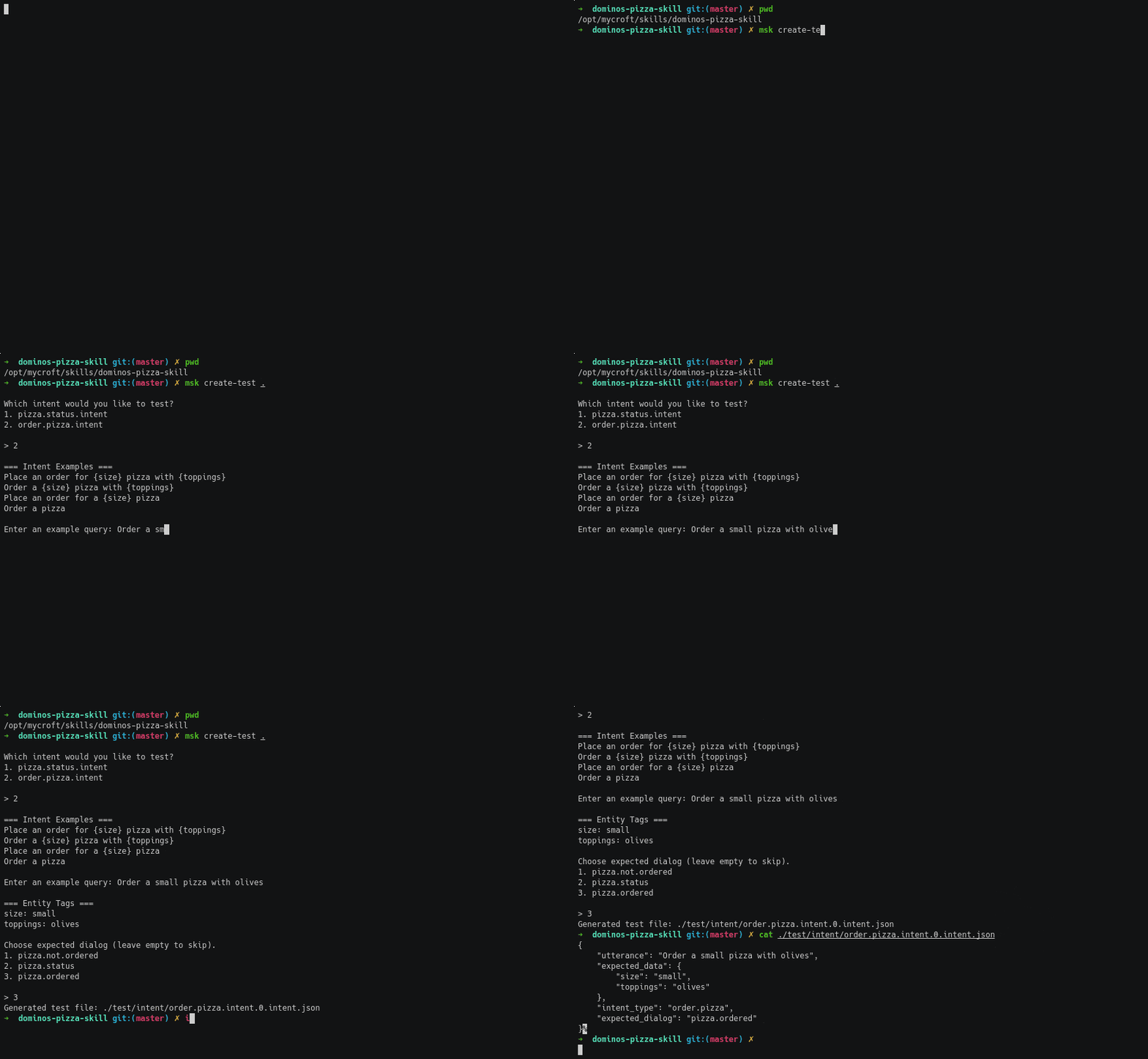](https://asciinema.org/a/Ayzaj6QJbKGBfs2eIQWr11idH?speed=1.5)
As before if the mycroft-core github installation is used make sure to use `mycroft-msk` or activate the mycroft-core Python *virtual environment*. From the mycroft-core folder
`$ source .venv/bin/activate`
Next, we use the `msk create-test` function. You *must* pass the **Skill** directory location to the command, or it will fail.
```bash
$ msk create-test /opt/mycroft/skills/feed-the-corgi-skill/
Which intent would you like to test?
1. corgi.the.feed.intent
> 1
=== Intent Examples ===
Corgi the feed
Enter an example query: have I fed the corgi today?
Choose expected dialog (leave empty to skip).
1. corgi.the.feed
> 1
Generated test file: /opt/mycroft/skills/feed-the-corgi-skill/test/intent/corgi.the.feed.intent.0.intent.json
```
If we have a look inside the `corgi.the.feed.intent.0.intent.json` file we can see that the test has been created for us.
```javascript
$ cat /opt/mycroft/skills/feed-the-corgi-skill/test/intent/corgi.the.feed.intent.0.intent.json
{
"intent_type": "corgi.the.feed",
"expected_dialog": "corgi.the.feed",
"utterance": "have I fed the corgi today?"
}
```
## Upload Skill
`msk` also provides a function for uploading a **Skill** to the [Mycroft Skills Repo](https://github.com/mycroftai/mycroft-skills), as part of our \[Skill Submission Process] ().
Please see this ASCII Cinema video to see the process for using `msk upload`:
[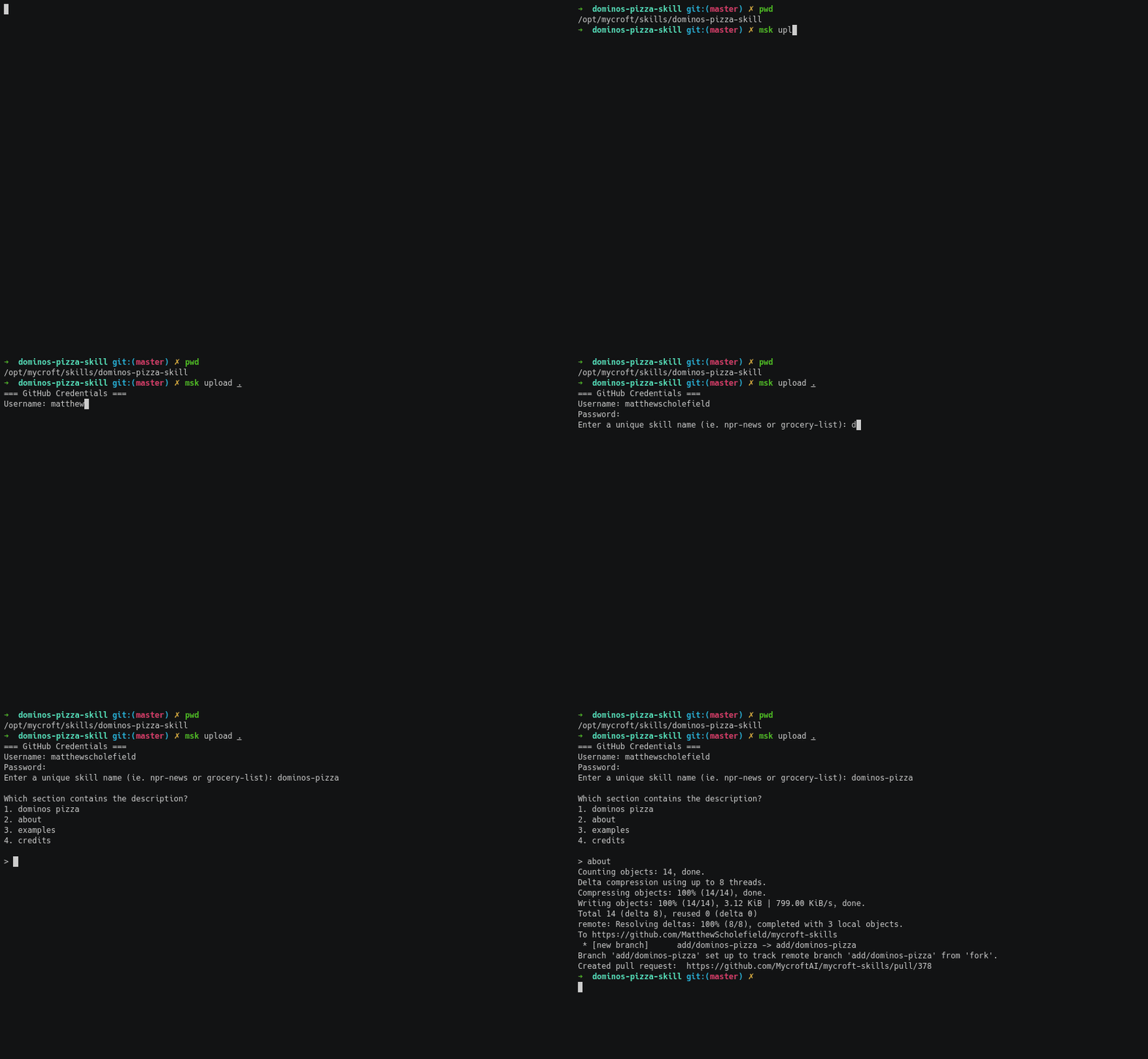](https://asciinema.org/a/Bp1sORVnmVz9wYjZXfempTPoO?speed=1.5)
If using the msk delivered with the mycroft-core github installation be sure to use `mycroft-msk` or activate the mycroft-core Python *virtual environment*. From the mycroft-core folder
`$ source .venv/bin/activate`
You will now see that your `bash` prompt is prefixed with `(venv)`.
Next, we use the `msk upload` command with the path to the **Skill**:
```bash
$ msk upload /opt/mycroft/skills/feed-the-corgi-skill/
=== GitHub Credentials ===
Username: YourGitHubUserName
Password:
Enter a unique skill name (ie. npr-news or grocery-list): feed-the-corgi
Counting objects: 531, done.
Delta compression using up to 8 threads.
Compressing objects: 100% (339/339), done.
Writing objects: 100% (531/531), 123.54 KiB | 0 bytes/s, done.
Total 531 (delta 298), reused 304 (delta 177)
remote: Resolving deltas: 100% (298/298), completed with 6 local objects.
To https://github.com/YourGitHubUserName/mycroft-skills
* [new branch] add/feed-the-corgi -> add/feed-the-corgi
Branch add/feed-the-corgi set up to track remote branch add/feed-the-corgi from fork.
Created pull request: https://github.com/MycroftAI/mycroft-skills/pull/392
```
## Upgrade Skill
`msk` also provides a function for upgrading a **Skill** once it has been merged into the [Mycroft Skills Repo](https://github.com/mycroftai/mycroft-skills), as part of our \[Skill Submission Process] ().
### Before you upgrade
Before you can use `msk upgrade`, you must ensure:
* That your **Skill** has already been merged with the `mycroft-skills` repo.
* That you have made changes to your **Skill** and that these changes have been committed to the **Skill's** `git` repository.
Once your changes are committed, you can then use `msk upgrade` by passing the location of the Skill folder. Generally we find it's easiest to be inside the Skill's folder in `/opt/mycroft/skills/SKILL-NAME` and then use the current directory symbol, period `.`
```
(.venv) kathyreid@kathyreid-Oryx-Pro:/opt/mycroft/skills/kathy-msk-test-skill$ msk upgrade .
=== GitHub Credentials ===
Username: KathyReid
Password:
Counting objects: 3, done.
Delta compression using up to 8 threads.
Compressing objects: 100% (3/3), done.
Writing objects: 100% (3/3), 877 bytes | 877.00 KiB/s, done.
Total 3 (delta 1), reused 0 (delta 0)
remote: Resolving deltas: 100% (1/1), completed with 1 local object.
remote:
remote: Create a pull request for 'upgrade-kathy-msk-test-skill' on GitHub by visiting:
remote: https://github.com/KathyReid/mycroft-skills/pull/new/upgrade-kathy-msk-test-skill
remote:
To https://github.com/KathyReid/mycroft-skills
* [new branch] upgrade-kathy-msk-test-skill -> upgrade-kathy-msk-test-skill
Branch 'upgrade-kathy-msk-test-skill' set up to track remote branch 'upgrade-kathy-msk-test-skill' from 'fork'.
=== Upgrade kathy-msk-test-skill ===
'This upgrades kathy-msk-test-skill to include the following new commits:
- [test for msk](https://github.com/KathyReid/kathy-msk-test-skill/commit/6d0e3552314673402e6f44ee90ee29feff6075ca)
Created with [mycroft-skills-kit](https://github.com/mycroftai/mycroft-skills-kit) v0.3.10
Created PR at: https://github.com/MycroftAI/mycroft-skills/pull/661
```
`msk upgrade` will create a new PR on the [Mycroft Skills Repo](https://github.com/mycroftai/mycroft-skills), and this will be reviewed using the [Skills Acceptance process](https://mycroft.ai/documentation/skills/skills-acceptance-process/).
* If you try to run `msk upgrade` and your Skill has not yet been merged, you will receive the error:
```
(.venv) kathyreid@kathyreid-Oryx-Pro:/opt/mycroft/skills/kathy-msk-test-skill$ msk upgrade .
NotUploaded: The skill kathy-msk-test-skill has not yet been uploaded to the skill store
```
* If have uncommitted items, you will receive the error:
```
(.venv) kathyreid@kathyreid-Oryx-Pro:/opt/mycroft/skills/kathy-msk-test-skill$ msk upgrade .
AlreadyUpdated: The latest version of kathy-msk-test-skill is already uploaded to the skill repo
(.venv) kathyreid@kathyreid-Oryx-Pro:/opt/mycroft/skills/kathy-msk-test-skill$ git status
On branch master
Your branch is up to date with 'origin/master'.
Changes not staged for commit:
(use "git add ..." to update what will be committed)
(use "git checkout -- ..." to discard changes in working directory)
modified: README.md
no changes added to commit (use "git add" and/or "git commit -a")
```
You need to ensure that your changes are committed:
```
(.venv) kathyreid@kathyreid-Oryx-Pro:/opt/mycroft/skills/kathy-msk-test-skill$ git commit -a
[master 6d0e355] test for msk
1 file changed, 3 insertions(+)
(.venv) kathyreid@kathyreid-Oryx-Pro:/opt/mycroft/skills/kathy-msk-test-skill$ git push -u origin master
Username for 'https://github.com': KathyReid
Password for 'https://KathyReid@github.com':
Counting objects: 3, done.
Delta compression using up to 8 threads.
Compressing objects: 100% (3/3), done.
Writing objects: 100% (3/3), 326 bytes | 326.00 KiB/s, done.
Total 3 (delta 2), reused 0 (delta 0)
remote: Resolving deltas: 100% (2/2), completed with 2 local objects.
To https://github.com/KathyReid/kathy-msk-test-skill
5c9a7f2..6d0e355 master -> master
Branch 'master' set up to track remote branch 'master' from 'origin'.
```
## Join our Skills Authoring Community
[Join other Skill Authors in Mycroft Chat](https://chat.mycroft.ai/community/channels/skills).